How to Interpret Security Server Proxy Error Messages?
About Security Server Proxy Error Messages
The first step in the error resolution process is to understand where the error message originated in. Therefore, it is important to know what are the components involved in the message flow:
- Service consumer
- Consumer-side Security Server (client proxy)
- Provider-side Security Server (server proxy)
- Service provider
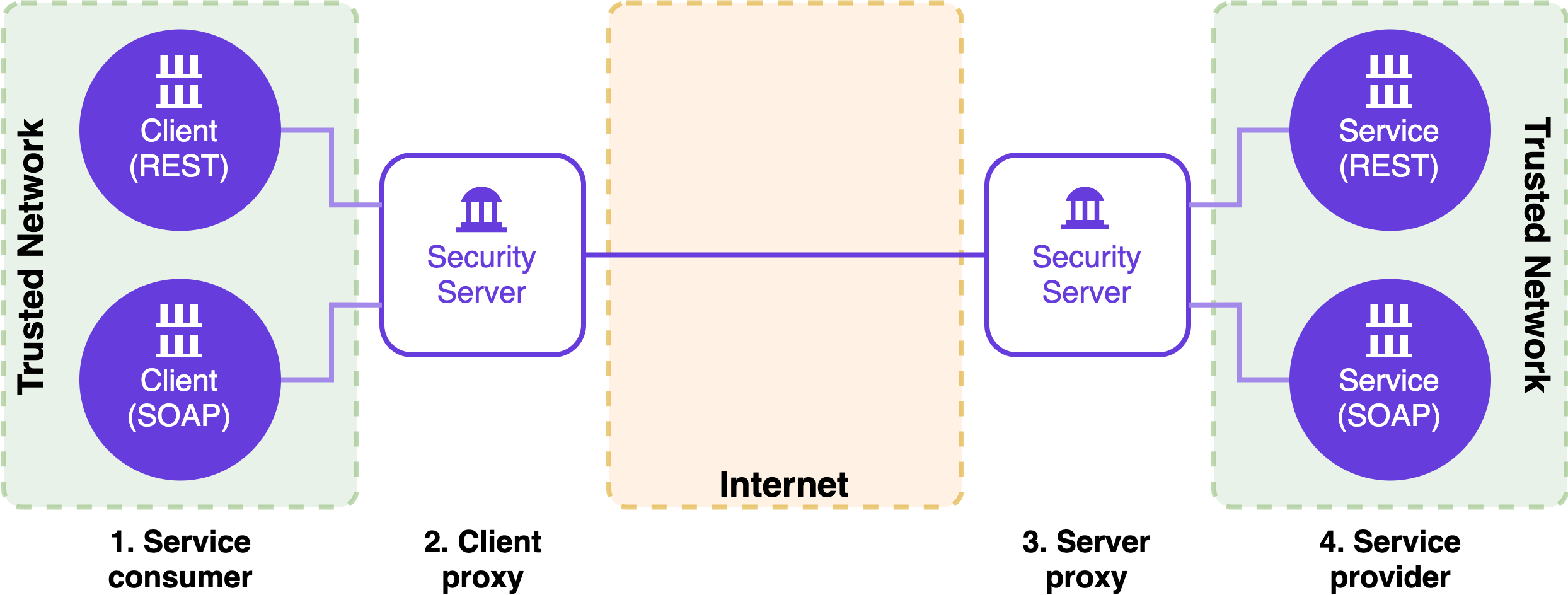
Error messages may be generated by the Security Servers (2, 3) or the service provider information system. Error messages generated by the Security Server have a fixed interface-specific (SOAP / REST) structure. However, SOAP and REST error messages contain the same information regardless of the messaging interface. Error messages generated by the Security Server contain three fields:
| Field | Description |
|---|---|
| type (REST) faultCode (SOAP) | Error code that tells where the error originated in - client proxy or server proxy - and the type of the error. Errors starting with "Server.ClientProxy" originate in the consumer side client proxy. In this case, more detailed information can be found in the consumer side Security Server proxy application log (/var/log/xroad/proxy.log). Errors starting with "Server.ServerProxy" originate in the provider side server proxy. In this case, more detailed information can be found in the provider side Security Server proxy application log (/var/log/xroad/proxy.log). |
| message (REST) faultString (SOAP) | More detailed description of the error. |
| detail (REST) faultDetail (SOAP) | A unique ID that can be used to search additional information from the proxy application log (/var/log/xroad/proxy.log). |
For example, an error message generated by the client proxy on the consumer side Security Server:
REST/JSON Error Message
{
   "type":"Server.ClientProxy.SslAuthenticationFailed",
   "message":"Client (SUBSYSTEM:PLAYGROUND/COM/1234567-8/TestClient) specifies HTTPS but did not supply TLS certificate",
   "detail":"2ea02d93-e0b8-4e2b-8c6e-fac20f53a3e3"
}
REST/XML Error Message
<?xml version="1.0" encoding="UTF-8" standalone="no"?>
<error>
    <type>Server.ClientProxy.SslAuthenticationFailed</type>
    <message>
        Client (SUBSYSTEM:PLAYGROUND/COM/1234567-8/TestClient)
        specifies HTTPS but did not supply TLS certificate
    </message>
    <detail>2ea02d93-e0b8-4e2b-8c6e-fac20f53a3e3</detail>
</error>
SOAP Error Message
<?xml version="1.0" encoding="UTF-8"?>
<SOAP-ENV:Envelope xmlns:SOAP-ENV="http://schemas.xmlsoap.org/soap/envelope/">
   <SOAP-ENV:Body>
      <SOAP-ENV:Fault>
         <faultcode>
            Server.ClientProxy.SslAuthenticationFailed
         </faultcode>

         <faultstring>
            Client (SUBSYSTEM:PLAYGROUND/COM/1234567-8/TestClient)
            specifies HTTPS but did not supply TLS certificate
         </faultstring>

         <faultactor/>

         <detail>
            <faultDetail>
                b782c3a4-f279-43d1-8684-2af318ec2ca5
            </faultDetail>
         </detail>

      </SOAP-ENV:Fault>
   </SOAP-ENV:Body>
</SOAP-ENV:Envelope>
Also, errors may occur in the service provider information system. In that case, the service provider is free to return any custom error message as long as it's aligned with the X-Road message protocol. In case an error message is returned and it does not follow the structure presented above, the error was generated by the service provider information system.
Consumer Side Security Server
The table below contains the most common error messages originated in the consumer side Security Server and their descriptions.
Please note that this is not an exhaustive list of all the errors generated by the Security Server proxy.
Prior to version 7.8 error codes has used PascalCase instead of snake_case.
| Error code (type / faultCode) | Error message (message / faultString) | Description |
| server.clientproxy.unknown_member | The request contains invalid client or service identifier. | |
| Client 'SUBSYSTEM:instanceIdentifier/memberClass/memberCode/subsystemCode' not found | In case the client is not found, the client specified in the request is not registered on the consumer side Security Server. | |
| Could not find addresses for service provider 'SERVICE:instanceIdentifier/memberClass/memberCode/subsystemCode/serviceCode' | In case addresses for service provider are not found, there's an error in the service identifier. Please make sure that the value of the service identifier in the request is correct and corresponds to the information registered on the service provider's Security Server. | |
| server.clientproxy.network_error | ||
Could not connect to any target host ([https://<TARGET_HOST>:5500/]) |
The consumer side Security Server is not able to establish a network connection to the provider side Security Server. The problem is usually caused by incorrect firewall configurations. On the consumer side Security Server, outgoing traffic to the provider side Security Server's ports 5500 and 5577 must be allowed. On the provider side Security Server, incoming traffic to ports 5500 and 5577 from the consumer side Security Server must be allowed. | |
| Name or service not known. No address associated with hostname. | DNS lookup of the provider side Security Server fails, because the server is registered with a wrong public FQDN name. Contact the administrator of the provider side Security Server. | |
| server.clientproxy.cannot_create_signature.signer.token_not_active | Token 'softToken' not active | |
| server.clientproxy.service_failed.internal_Error | Cause of the error, for example: Invalid instance identifier: instanceIdentifier | Processing the request failed because of an internal error on the consumer side Security Server. Check the proxy application log (/var/log/xroad/proxy.log) for details. |
| server.clientproxy.ssl_authentication_failed | ||
| Security server has no valid authentication certificate | The consumer side Security Server does not have a valid authentication certificate. The authentication certificate may not exist, it may be disabled, it may not be registered or it may not have a valid OCSP status. To fix the problem, please try the following actions:
|
|
| Service provider did not send correct authentication certificate | The provider side Security Server does not have a valid authentication certificate. The authentication certificate may not exist, it may be disabled, it may not be registered or it may not have a valid OCSP status. To fix the problem, please try the following actions:
|
|
| Client (SUBSYSTEM:instanceIdentifier/memberClass/memberCode/subsystemCode) specifies HTTPS but did not supply TLS certificate | ||
| Client (SUBSYSTEM:instanceIdentifier/memberClass/memberCode/subsystemCode) specifies HTTPS NO AUTH but client made plaintext connection | The connection type of the client subsystem used by the service consumer is set to HTTPS NO AUTH on the consumer side Security Server, but the service consumer tried to establish a connection using http. The HTTPS NO AUTH connection type enforces the use of https, but the client TLS certificate is not verified by the Security Server. In other words, https is used without mutual TLS authentication (mTLS). | |
| server.clientproxy.io_error | Could not find any certificates for member 'SUBSYSTEM:instanceIdentifier/memberClass/memberCode/subsystemCode'. Are you sure tokens containing the certifications are logged in? | The member owning the subsystem that's used as a client of the request does not have a valid sign certificate on the consumer side Security Server. The sign certificate may not exist, it may be disabled or it may not have a valid OCSP status. To fix the problem, please try the following actions:
|
| server.clientproxy.logging_failed.timestamper_failed | ||
| Cannot time-stamp messages: no timestamping services configured | Time-stamping of messagelog records failed, because no time-stamping service has been configured on the consumer side Security Server. | |
| Cannot time-stamp messages | Time-stamping of messagelog records may fail because of multiple reasons:
|
|
| server.clientproxy.outdated_global_conf | Global configuration is expired | The consumer side Security Server is not able to download global configuration from the Central Server and the local copy of the global configuration has expired. Check the configuration client application log (/var/log/xroad/configuration_client.log) for details. In case more detailed logging is required, adjust the configuration client logging levels. You can also try to restart the "xroad-confclient" process. $ systemctl restart xroad-confclientAlso, it's is possible that the consumer side Security Server is not able to establish network connection to the Central Server, e.g., invalid firewall configurations. |
| server.clientproxy.logging_failed.internal_error | Writing messages to the message log database fails on the the consumer side Security Server. | |
| Ask timed out on [Actor [ akka: // Proxy / user / LogManager # 2110275378 ]] after [40000 ms]. Sender [null] sent message of type "ee.ria.xroad.common.messagelog.LogMessage" | This may happen because the Security Server is over loaded or the hard disk is full. Check the CPU load and free disk space of the server. Restarting the server may also help. | |
| Futures timed out after [40 seconds] | This may happen because the Security Server is overloaded. Check the CPU load of the server. Restarting the server may also help. |
Provider Side Security Server
The table below contains the most common error messages originated in the provider side Security Server and their descriptions.
Please note that this is not an exhaustive list of all the errors generated by the Security Server proxy.
| Error code (type / faultCode) | Error message (message / faultString) | Description |
| server.serverproxy.access_denied | Request is not allowed: SERVICE:instanceIdentifier/memberClass/memberCode/subsystemCode/serviceCode | |
| server.serverproxy.service_failed.missing_header_field | Malformed SOAP message: header missing | The response message returned by the service provider information system is missing one or more mandatory SOAP headers. SOAP request and response messages must contain some X-Road specific headers. |
| server.serverproxy.service_failed.invalid_soap | Cause of the error, for example: org.xml.sax.SAXParseException; Premature end of file. | The service provider information system returned a malformed SOAP message as a response. Check the proxy application log (/var/log/xroad/proxy.log) for details. In case more detailed logging is required, adjust the proxy logging levels. |
| server.serverproxy.unknown_service | Unknown service: SERVICE:instanceIdentifier/memberClass/memberCode/subsystemCode/serviceCode | The service identified by the service code included in the request does not exist on the service provider's Security Server. Please make sure that the value of the service code in the request is correct and corresponds to the information registered on the service provider's Security Server. |
| server.serverproxy.service_failed.http_error | Cause of the error, for example: Server responded with error 301: Moved Permanently | The service provider side Security Server wasn't able to successfully connect to the service provider information system. Check the proxy application log (/var/log/xroad/proxy.log) for details. In case more detailed logging is required, adjust the proxy logging levels. |
| server.serverproxy.service_failed.internal_error | Processing the request failed because of an internal error on the provider side Security Server. | |
| Signer.UnknownMember: Could not find any certificates for member'SUBSYSTEM:instanceIdentifier/memberClass/memberCode/subsystemCode'. Are you sure tokens containing the certifications are logged in? | On the provider side Security Server there's a problem with the sign certificate of the member owning the service that is invoked. The sign certificate may not exist, it may be disabled or it may not have a valid OCSP status. To fix the problem, please try the following actions:
|
|
| Connection pool shut down | The provider side Security Server is not able to access its database. Check the proxy application log (/var/log/xroad/proxy.log) and Postgres log (/var/log/postgresql/) for details. In case more detailed logging is required, adjust the proxy logging levels. | |
| server.serverproxy.service_failed.cannot_create_signature | Failed to get signing info for member HttpError: Connection to Signer (port 5558) timed out | There's a problem with signer on the provider side Security Server. Check the signer application log (/var/log/xroad/signer.log) for details. In case more detailed logging is required, adjust the signer logging levels. You can also try to restart the "xroad-signer" process. $ systemctl restart xroad-signer |
| server.serverproxy.ServiceFailed.invalid_content_type | Invalid content type: <CONTENT_TYPE> |
The service provider information system returned a response message which content type isn’t supported by the provider side Security Server. The supported content-types for SOAP services are text/xml, application/xop+xml and multipart/related. Instead, there are no restrictions for REST services' content-types. |
| server.serverproxy.CannotCreateSignature.Signer.token_not_active | Token 'softToken' not active | |
| server.serverproxy.ssl_authentication_failed | Server certificate is not trusted | SSL authentication between the service provider side Security Server and the service provider information system failed. The error occurs when the "Verify TLS certificate" option is selected in the service configuration, but the service certificate hasn't been uploaded to the provider side Security Server. The error can be resolved by unchecking the "Verify TLS certificate" option or uploading the service certificate to the provider side Security Server. |
| Client SUBSYSTEM:<instanceIdentifier>/<memberClass>/<memberCode>/<subsystemCode> has no IS certificates | SSL authentication between the service provider side Security Server and the service provider information system failed. The error occurs when the "Verify TLS certificate" option is selected in the service configuration, but the service certificate hasn't been uploaded to the provider side Security Server. The error can be resolved by unchecking the "Verify TLS certificate" option or uploading the service certificate to the provider side Security Server. | |
| server.serverproxy.logging_failed.timestamper_failed | ||
| Cannot time-stamp messages: no timestamping services configured | Time-stamping of messagelog records failed, because no time-stamping service has been configured on the service provider side Security Server. | |
| Cannot time-stamp messages | Time-stamping of messagelog records may fail because of multiple reasons:
|
|
| server.serverproxy.outdated_global_conf | Global configuration is expired | The service provider side Security Server is not able to download global configuration from the Central Server and the local copy of the global configuration has expired. Check the configuration client application log (/var/log/xroad/configuration_client.log) for details. In case more detailed logging is required, adjust the configuration client logging levels. You can also try to restart the "xroad-confclient" process. $ systemctl restart xroad-confclientAlso, it's is possible that the service provider side Security Server is not able to establish network connection to the Central Server, e.g., invalid firewall configurations. |
| server.serverproxy.logging_failed.internal_error | Writing messages to the message log database fails on the the service provider side Security Server. | |
| Ask timed out on [Actor [ akka: // Proxy / user / LogManager # 2110275378 ]] after [40000 ms]. Sender [null] sent message of type "ee.ria.xroad.common.messagelog.LogMessage" | This may happen because the Security Server is overloaded or the hard disk is full. Check the CPU load and free disk space of the server. Restarting the server may also help. | |
| Futures timed out after [40 seconds] | This may happen because the Security Server is overloaded. Check the CPU load of the server. Restarting the server may also help. | |
| server.serverproxy.io_error | Received fatal alert: handshake_failure | TLS handshake between the Security Server and the service provider information system failed. This may happen because the Security Server and the service provider information system don’t support the same TLS ciphers and/or TLS protocol versions. By default, the Security Server supports TLSv1.2. Supported TLS versions and ciphers can be configured using the proxy.client-tls-ciphers and proxy.client-tls-protocols properties. |